Accelerator
NVIDIA
The NVIDIA CUDA metrics are enabled if you have Linaro Forge Ultimate or the Accelerator add-on. Contact Forge Support for upgrade information.
Note
NVIDIA accelerator metrics are not available when linking to the static Linaro Forge sampler library.
- GPU utilization
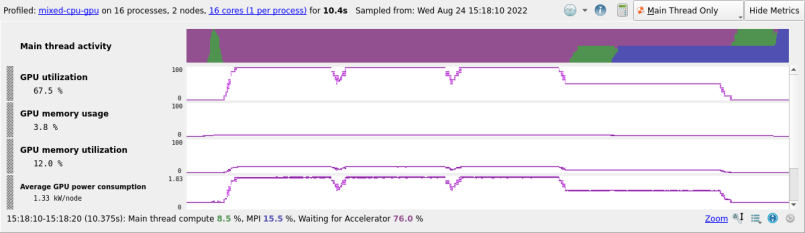
Percent of time that the GPU card was in use, that is, one or more kernels are executing on the GPU card. If multiple cards are present in a compute node this value is the mean across all the cards in a compute node. Adversely affected if CUDA kernel analysis mode is enabled.
See CUDA Kernel analysis.
- GPU memory usage
The memory allocated from the GPU frame buffer memory as a percentage of the total available GPU frame buffer memory.
- GPU memory transfers
Metrics summarizing CUDA memory transfers are available for CUDA 11+ programs, including heterogeneous workloads where some processes use GPUs and others do not.
Three categories of metric are available:
Byte Transfer Rate: Bytes transferred per second per process.
Memory Transfer Rate: Transfers per second per process.
Time Spent in Memory Transfers: Proportion of time in transfers per process.
Note
If a very large number of memory transfer events occur in the program, the time spent in memory transfers metric might only provide an approximation.
Different types of memory transfer can occur in the program you are profiling. For example, the program can transfer data between host memory and GPU device, or between different GPU devices on the host. Six memory transfer types are available within each category:
- Host to Device
A host to device memory copy.
- Device to Host
A device to host memory copy.
- Device to Device
A device to device memory copy on the same device.
- Host to Host
A host to host memory copy.
- Peer to Peer
A peer to peer memory copy across different devices.
- Off-device
Sum of host-to-device, device-to-host, and peer-to-peer types (everything using PCIe or NVLink).
Selecting the category using the preset mechanism displays the relevant metrics for all memory transfer types occurring within the program.
AMD
The AMD ROCm metrics are enabled if you have a Linaro Forge license with ROCm support. Contact Forge Support for upgrade information.
Note
AMD accelerator metrics are not available when linking to the static Linaro Forge sampler library.
- GPU utilization
Percent of time that the GPU card was in use, that is, one or more kernels are executing on the GPU card. If multiple cards are present in a compute node this value is the mean across all the cards in a compute node.
- GPU memory usage
The memory allocated from the GPU Video RAM (VRAM) as a percentage of the total available GPU memory VRAM.
- GPU memory utilization
Percentage of time that the GPU memory was in use. If multiple cards are present in a compute node, this value is the mean across all the cards in a compute node.
NCCL
The NCCL metrics are enabled if you have a Linaro Forge license with CUDA support. Contact Forge Support for upgrade information.
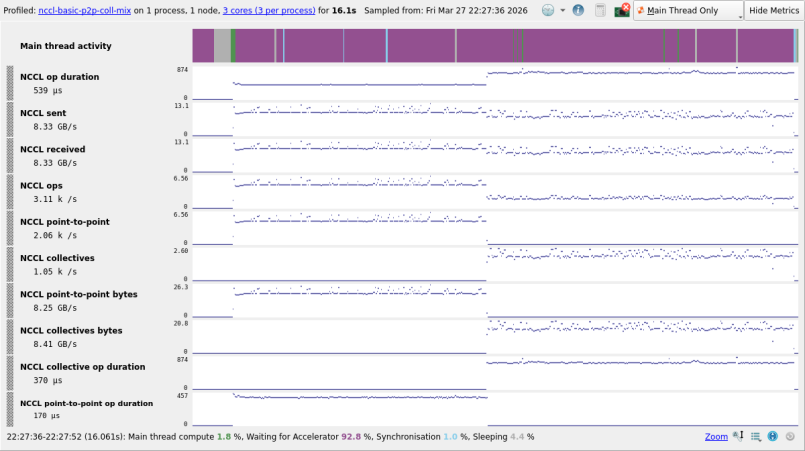
When profiling programs using NCCL, information regarding NCCL data transfers in your application is displayed. NCCL metrics are all per-process metrics, so when running with multiple NCCL ranks per process, reported values capture the combined behavior of all the NCCL ranks in each process. NCCL metrics can provide greater understanding regarding the GPU communication patterns of your application, detecting imbalance between NCCL ranks running on different processes, and help identify how network changes could improve application performance.
- NCCL op duration
This metric tracks the time spent in a NCCL op so far, which is measured by the total sample duration in which the corresponding GPU kernel is active. All other NCCL metrics involving a duration follow this approach. The host function call to schedule a NCCL op is not included in this measurement.
- NCCL sent/received
This pair of metrics tracks the number of bytes that NCCL ops operate on per second.
- NCCL ops, point-to-point and collective operations
These metrics track the number of NCCL point-to-point and collective ops per second.
- NCCL point-to-point and collective bytes
This pair of metrics tracks the number of bytes that NCCL ops operate on per second, combining the send and receive transfers for each NCCL op type.
In addition, there are some advanced NCCL metrics which give you a further breakdown of communication:
- NCCL point-to-point and collective duration
This pair of metrics tracks the time spent in a NCCL op so far, broken down by each NCCL op type.